28 February, 2021
American Fast
01 November, 2020
A Brokenhearted Ebenezer
The Ebenezer stone was precious, even though it was erected in the middle of a mess.
Samuel (1 Sam 7:10) stands up the Ebenezer stone saying, "Thus far the LORD has helped us." They had just been granted a big deliverance from and victory over the Philistines (after 20 years of failure), and they now have a big chunk of the promised land. They called on the LORD, instead of trying to do it all in their own strength, and he answered. They had "done good", and they had done it by the LORD's mercy.
The moment deserved to be commemorated. Their thankfulness was utterly appropriate. Their worship was timely.
And soon they called for God to let them follow a king instead of him. Soon they chased after idols. Soon they followed Saul into pride. Later they let their idolatry offend God so much the North and then the South were carried into captivity. After such glory and promise, their story continued to be filled to the top and overflowing with shame.
After centuries of loss, after all the pain and shame, they returned from Babylon to Israel. The Ebenezer stone was still standing there.
What were they to make of that stone 500 years later, after 500 years of shame and failure, 500 years of shattered promise?
Did that stone now testify against them? Did it mock them? Did it, 500 years later, tell them "no further will God help you, after all you've done"?
I look back, and my life is filled with forgotten Ebenezers, moments that the LORD delivered me by grace and following moments when I failed all over again. There are many of those places God fought to turn me toward Him, to grow me toward truth, and where he succeeded only to have me find some new way to fail all over again. There are many places I grew toward him and not away, only to fail all over again.
I have hid my face in shame from those pregnant moments all these years. I could not bear to remember the face plant following each of them. I remember where the LORD took my hand and brought me "thus far" only to watch me stumble again from the path.
It helps a little to see each Ebenezer as, rather than a boundary, a mile marker. I can hold my progress "thus far" precious as I remember the markers laid down those sad years ago, and remember mile marker flowed after mile marker. If I can remember each Ebenezer, maybe I can believe there's another left to me, somewhere out there, another place to which the LORD will take further.
Perhaps, God still has a beautiful plan for my life.
11 October, 2020
Me and My House
In Joshua 24, Joshua himself tells the people to choose whether they will worship their old gods, or YHWH, who had loved and saved them. As for him and his house, they would serve the LORD.
The people agree to do the same as Joshua. Joshua responds by saying they think they can, but they cannot. They will fail, because God is a jealous God.
In Sunday School I learned today something of what Joshua meant when he said those words.
No god, before that time, had ever been jealous.
The people of Israel had some history in Babylon, lots of history in Egypt, and a growing history of Canaanite religions in their toolbags. They knew the gods. They were men of the world, and they knew how things worked. What's more, Joshua knew they knew.
Today, if you want your car fixed, you go to a mechanic. If you want your back fixed, you go to a chiropractor. If you are having allergies, you go to CVS and pick up some Benadryl. In each case, you provide the same things: you describe your need, you lay down some money, you go out and do something with the guidance you receive.
In Joshua's day, if you wanted a good crop you offered a part of your dinner to the god of crops. If you wanted children you made a larger offering to the fertility god. If you were headed out to battle you offered something huge to the god of war. The gods of storms, of sun, of rivers were the CVS, the Well Fargo Bank, and the 401k's of their time. You went to the appropriate god, laid down something of value to the god, and went out to do the things the god would bless.
None of those gods was jealous. No more than CVS is mad when you put money in your 401k, or Wells Fargo hates when you visit your mechanic, did Ba'al hate when you offered good things to Astarte. Dealings with the gods were business. The gods had needs and so did the people, so one could scratch their backs and hope they would scratch happily back in the right place. Joshua told the people YHWH was like some giant amazon.com in the sky offering every service, in the midst of the great economy of gods, and if they transacted with any god but YHWH he would destroy them. YHWH was jealous.
Joshua's words were so foreign the people quickly agreed to them without even noticing they had no idea what he was talking about. The Book of Judges reveals just how short the people fell from understanding what they affirmed.
I think we find ourselves in the same situation.
The Holy Spirit has promised to guide us into all truth, but we mingle our ideologies. Confronted with a ballot, we consult the god of capitalism for guidance, the god of socialism, the gods of Wall Street and Pennsylvania Avenue. We hear the multiplied voices of those who decry abortion or gun violence screaming in our ears, and we seek out the right crowd to follow.
Jesus warns us broad is the way and many are those who travel in it.
Today, in this environment, I'm not sure yet I understand Jesus or the guidance of his Holy Spirit any better than those enthused Israelites who knew exactly the right words to shout to Joshua.
13 September, 2020
The Righteous Live Together
17 July, 2020
Battle Flags Cannot Heal
22 June, 2020
Listening to Experiences Not Our Own
25 December, 2019
Le Poignard
Maybe...
Or maybe I'm obsessed with not switching between keyboard and mouse!
I'd like to introduce my newest dictionary, the Poniard. The poniard is the left-handed dagger of Steno. It was used in place of a shield during polite European swordplay, and was quite the discovery. A poniard was easier to carry when shopping for the Mrs. than even the smallest shield, allowed the user to be offensive, and generally looked cool on a gentleman's hip. Now, just like a dashing Renaissance swordmaster, anyone will be able to sally forth in style while fending off rude emails.
This steno poniard is a left-handed dictionary. Using it, I'm able to type 99% of anything I'd ever type with both hands, but without releasing the mouse at any point. It's perfect for all flavors of editing. With the right hand firmly wielding the mouse I slash the cursor madly wherever I have text to expunge, cut it with the left, click again where it needs pasting, drop it in with the left, and fly bravely into the next grammatical disaster to begin again.
Using nothing but my trusty poniard, I am able to type this paragraph entire (to include arrowing around and adding random punctuation - like! and? 4 no good "reason", or 'cause' if you'd rather. And, yes, the lowly ` and * can be found.) Things like [], {}, and <> are present, of course, as are =, +, ^, and /. I tweaked the number system so 1234567890,10,11,12 are all available through the Nimble Number System and added the traditional punctuation marks with them. Shift-8 gives you a *. I've also built in F 1-12 with any one of shift, control, and alt.
Yes, that paragraph entire was typed using the poniard. My right hand was lazily draped across the back of the couch the entire time. I achieved a stunning 3 words per minute doing so. Needless to say, that's with no muscle memory, since I just finished building it, but I'm beginning to feel the love. A year from now, I'd love to be up to 20 words per minute with it. That's okay, because I intend to use it mostly as an editing enabler.
Things like arrowing around, pasting, deleting, and typing individual letters to make a plural of a lonely word work great with this system. Things like alt-F4 and ctrl-W are breathtakingly easy. It was actually made to ctrl-A, ctrl-C, ctrl-V and does so with STKPWRO/KRO*/SRO*.
You'll recognize the C and the V, and gather adding an O adds the control key to the stroke. The A is the new stroke there, being STKPWR (best read as Z+R). It's always been the vowels that killed any singlehanded system, and not just E and U. Every consonant can be made using the 7 keys of the left fingers. It's the vowels that stubbornly refuse to fit. I've treated the left-hand keyboard as 7 keys plus 4 modifiers (being the #, *, A, and O). Using those 11 keys, I've generated something like 250 strokes. It's a bit tight, but I've tried to impose some order.
The consonants are unchanged. The vowels are all Z-based. Z+R=A, Z+R*=O, Z+H=E, Z+H*=U, Z+HR*=I. Yes, I is a full mash of all finger keys. Adding the traditional steno A-key adds "shift" to the letter. That's how you make a capital letter. Adding O adds "control". Adding AO does not add "shift-control" to the letter, as you might expect, but adds "alt". So, you can add the 3 main modifiers to the keys, but not in combinations like shift-control or alt-control. So far, that's not hurt me. If I deem it necessary, I've got an idea for that, but it will be complex and I'm going to let the stuff I have sink in a bit before I try to go that far.
The action keys, like return, backspace, delete, page up and down, tab, et cetera are all available and use the patterns already proven in the Nimble Single Stroke Commands dictionary. Again, adding shift, control, and alt is done the same way as the letters.
The function keys were a little tricky, but I've gone with the Nimble Number System again, and this time added *. So, hitting a nimble 8+* will give you F8. Add an O to that, and you have control-F8.
And then things get even stickier. Sorry. It's the best I was able to do, and I'm getting quite comfortable with it. The next 16 patterns are all just shape-based.
SKWH: ,.!?
STPR :;/\
SKPH ([{<
STWR "'`*
Make the shape to get the first character in the list. Add A for the second, add O for the third, add AO for the fourth. And then, if you add * to any shape, you get a variation of the plain character. You might get a close bracket or a space-less version of the same punctuation.
Just one more note to make here. I lost two left-hand-only briefs that I cared about. Other's mileage may vary. I lost KPA* to force upper case without a space. At the same time, I needed a way to force lowercase as well, so I put all that on STK. STK forces lower, STK* forces upper case, and STKA* forces a blank space then upper. If you feel more need to keep using KPA than to have X, though, you can just add a KPA* at the end of the dictionary to override the dictionary's default.
# Give the left hand ability to force to "lower", "upper", and "upper with space" commands
values['STK'] = '{^^}'
values['STK*'] = '{^}{-|}'
values['STKA*'] = '{}{-|}'
And then I needed to replace WR for were. I used WE*R. Again, if you don't expect to need the right arrow, you can create an override and get it back.
# Add-ons to make up for briefs we've overwritten
# Replace WR (were)
values['W*ER'] = 'were'
Okay. That about does it for a first introduction. If enough people think this has potential and want documentation I'm sure I can be persuaded. Here's hoping someone else thinks it's a useful idea.
Poniard
09 November, 2019
Nimble Numbers - Update
The Nimble Number system v2 is now available to any Plover user on any Plover-compatible keyboard of the classic Ireland 23- key layout.
The classic stenography numbering system uses: STPH- for 1, 2, 3, and 4; -FPLT for 6, 7, 8, and 9; and AO- for 5 and 0. You can create a number of arbitrary length, as long as that number is in steno order. At some point, someone introduced the idea of adding -EU to any pair of numbers to reverse them. So, using classic steno, you can write any 2-digit number and several longer numbers if you're lucky. It was always a fun game to see how few strokes you could use to type a long number. With some cleverness, you could often find a 3-digit or even 4-digit single stroke.
Nimble's system is superior. He uses STPH-in combinations to create every digit from 0-9. That's the best thing about his system. The counting numbers to 9 are all on the left hand. Beyond that, though, he then replicates the pattern on -FPLT to make a 2-digit number, on -RBGS to make a 3rd digit, and on SKWR- to make a fourth digit. That's sweet. And for one more great piece of goodness, he uses AOEU to add marks like the $ and %. I don't actually know what the combinations are he uses, but I didn't let a little thing like complete ignorance slow me down. I've created my own.
AOEU can create 16 combinations, so I've created the ability to add 16 decorations: $, ., :, -, (), and / in several different forms. You can now single-stroke $12.34, (1234), 18:00, and 12.34%. Granted, they're all finger-twisters, but you don't have to start to that way. I'm certainly not.
I'm getting used to the idea by working mostly with 1 and 2 digit numbers. They're pretty easy. I'm also getting up to speed pretty quickly on IP addresses, which use some 3-digit numbers. 3 is not too hard. I do have to say, the 4-digit numbers are very hard because I had to compromise the S- key. The original system relied on the S- being split into two keys. I could not do that. Instead, wherever you would hit the lower S-, you have to hit the *. It's a sad accommodation, but it still leaves those numbers available to me if I ever find one I need to use a lot.
So, the dictionary comes with 3 Help Strokes. Hit #-F, #-P, and #-L to see the following 3 bits of detailed help:
I need to improve this, but I'll put it out here now as a full disclosure thing.
#-F
....Writing Nimble Numbers
....How to stroke the numbers 0-14
...H 4
..P. 3
.T.. 2
S... 1
..PH 7
.TP. 6
ST.. 5
.TPH 9
STP. 8
STPH 0
S..H 10
.T.H 12
S.P. 11
S.PH 14
ST.H 13
#-P
....Nimble Numbers Table of Possibility
....Single stroke 1, 2, 3, and 4 digit numbers with all modifiers
---
- Bare number
.... 3 32 321 3217
- Leading decimal
.O.. .3 .32 .321 .3217
- Central decimal
.OE. .3 3.2 3.21 32.17
- $ alone
A... $3 $32 $321 $3217
- $ with central decimal
AOE. $.30 $3.20 $3.21 $32.17
- Trailing colon
..E. 3: 32: 321: 3217:
- O'clock
AO.U 3:00 32:00 321:00 3217:00
- Trailing hyphen
A..U 3- 32- 321- 3217-
- Negative as -
AO.. -3 -32 -321 -3217
- Leading (
A.E. (3 (32 (321 (3217
- Negative as()
A.EU (3) (32) (321) (3217)
- Trailing )
..EU 3) 32) 321) 3217)
- Percent symbol
...U 3% 32% 321% 3217%
- Percent with central decimal
.OEU .3% 3.2% 3.21% 32.17%
- Trailing /
AOEU 3/ 32/ 321/ 3217/
#-L
....Writing Several Nimble Numbers
....How to stroke 2, 3, and 4 digit numbers
The first digit of any number is typed on the STPH- keys
The second digit of any number is typed on the -FPLT keys
The third digit of any number is typed on the -RBGS keys
The fourth digit of any number is typed on the -*KWR keys
The fourth digit is a mess. Sorry. The S- could not be reused
so substitute the * for the S-, so it's out of sequence
To download and play with the dictionary, click here:
Nimble Numbers 2
To download and use the Nimble Numbers system with the single command dictionary, click here:
Nimble Single Stroke Commands 2
11 October, 2019
Nimble Numbers
No, really, it is.
Okay, well stenography is full of things that excite me, and when the community user Nimble mentioned he had a new way to write numbers, I was completely stoked. His system relied upon a custom keyboard, though, and therefore was not usable by me.
Enter determination.
The Nimble Number system is now available to any Plover user on any Plover-compatible keyboard of the classic Ireland 23- key layout.
The classic stenography numbering system uses: STPH- for 1, 2, 3, and 4; -FPLT for 6, 7, 8, and 9; and AO- for 5 and 0. You can create a number of arbitrary length, as long as that number is in steno order. At some point, someone introduced the idea of adding -EU to any pair of numbers to reverse them. So, using classic steno, you can write any 2-digit number and several longer numbers if you're lucky. It was always a fun game to see how few strokes you could use to type a long number. With some cleverness, you could often find a 3-digit or even 4-digit single stroke.
Nimble's system is superior. He uses STPH-in combinations to create every digit from 0-9. That's the best thing about his system. The counting numbers to 9 are all on the left hand. Beyond that, though, he then replicates the pattern on -FPLT to make a 2-digit number, on -RBGS to make a 3rd digit, and on SKWR- to make a fourth digit. That's sweet. And for one more great piece of goodness, he uses AOEU to add marks like the $ and %. I don't actually know what the combinations are he uses, but I didn't let a little thing like complete ignorance slow me down. I've created my own.
AOEU can create 16 combinations, so I've created the ability to add 16 decorations: $, ., :, -, (), and / in several different forms. You can now single-stroke $12.34, (1234), 18:00, and 12.34%. Granted, they're all finger-twisters, but you don't have to start to that way. I'm certainly not.
I'm getting used to the idea by working mostly with 1 and 2 digit numbers. They're pretty easy. I'm also getting up to speed pretty quickly on IP addresses, which use some 3-digit numbers. 3 is not too hard. I do have to say, the 4-digit numbers are very hard because I had to compromise the S- key. The original system relied on the S- being split into two keys. I could not do that. Instead, wherever you would hit the lower S-, you have to hit the *. It's a sad accommodation, but it still leaves those numbers available to me if I ever find one I need to use a lot.
So, the dictionary comes with 3 Help Strokes. Hit #-F, #-P, and #-L to see the following 3 bits of detailed help:
#-F
....Writing Nimble Numbers
....How to stroke the numbers 0-14
...H 0
..P. 1
.T.. 2
S... 3
..PH 4
.TP. 5
ST.. 6
.TPH 7
STP. 8
STPH 9
S..H 10
.T.H 11
S.P. 12
S.PH 13
ST.H 14
#-P
....Nimble Numbers Table of Possibility
....Single stroke 1, 2, 3, and 4 digit numbers with all modifiers
---
- Bare number
.... 1 12 123 1234
- Leading decimal
.O.. .1 .12 .123 .1234
- Central decimal
.OE. .1 1.2 1.23 12.34
- $ alone
A... $1 $12 $123 $1234
- $ with central decimal
AOE. $.10 $1.20 $1.23 $12.34
- Trailing colon
..E. 1: 12: 123: 1234:
- O'clock
AO.U 1:00 12:00 123:00 1234:00
- Trailing hyphen
A..U 1- 12- 123- 1234-
- Negative as -
AO.. -1 -12 -123 -1234
- Leading (
A.E. (1 (12 (123 (1234
- Negative as()
A.EU (1) (12) (123) (1234)
- Trailing )
..EU 1) 12) 123) 1234)
- Percent symbol
...U 1% 12% 123% 1234%
- Percent with central decimal
.OEU .1% 1.2% 1.23% 12.34%
- Trailing /
AOEU 1/ 12/ 123/ 1234/
#-L
....Writing Several Nimble Numbers
....How to stroke 2, 3, and 4 digit numbers
The first digit of any number is typed on the STPH- keys
The second digit of any number is typed on the -FPLT keys
The third digit of any number is typed on the -RBGS keys
The fourth digit of any number is typed on the -*KWR keys
The fourth digit is a mess. Sorry. The S- could not be reused
so substitute the * for the S-, so it's out of sequence
To download and play with the dictionary, click here:
Nimble Numbers
To download and use the Nimble Numbers system with the single command dictionary, click here:
Nimble Single Stroke Commands
21 June, 2019
Single Stroke Commands
Others are not so easily amused.
These people, the lazy and hard to please folk who demand their computer take no pointless breaks, control their computers like a guitar, performing several actions at once. They never take their hands off the keyboard, and issue complex commands with a stroke or two. They compose a new message, switch from email to browser, create a new tab, log on to a remote computer, switch to an ssh prompt, issue commands, copy configuration lines to a text editor, and get hacking without "lifting" at any point, at full throttle throughout.
This is the magic of "keyboard shortcuts", and they're almost enough to run a computer at full throttle, but even the mighty shortcut keys have a problem. Mere mortals cannot use them without lengthening their fingers another inch or so and learning to twist them with precision across two rows of keys to find distant Alt, Super, and Function keys in all their critical combinations and sequences.
Only stenographers can truly run at full throttle. Only stenographers have every keyboard shortcut at their fingertips.
Download the Single Stroke Commands Dictionary
Using the Single Stroke Commands dictionary within Plover, every keyboard shortcut is under your fingers in the home position. Install the dictionary per usual procedures, then hit the following key combinations to activate each keyboard shortcut.
To hit the 4 arrow keys:
KPR-FRLG is [Up] as {#Up}{^}{>}
TWH-FRLG is [Down] as {#Down}{^}{>}
SK-FRLG is [Left] as {#Left}{^}{>}
WR-FRLG is [Right] as {#Right}{^}{>}
To hit page up and page down with home and end keys
PHR-FRLG is [Page_Up] as {#Page_Up}{^}{>}
WHR-FRLG is [Page_Down] as {#Page_Down}{^}{>}
KPWR-FRLG is [Home] as {#Home}{^}{>}
TPWH-FRLG is [End] as {#End}{^}{>}
To hit named action keys
TKP-FRLG is [Escape] as {#Escape}{^}{>}
SP-FRLG is [Space] as {#Space}{^}{>}
SHR-FRLG is [Return] as {#Return}{^}{-|}
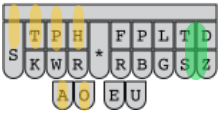
Any of the keys above can be combined with modifiers, along with any fingerspelled letter key. So, you can hit "[Shift]-[End]" or "[Super]-[T]" or "[Control]-[Shift]-[Alt]-[Tab]". The following diagrams show how to use the right hand to add modifiers to any key hit with the left hand, be it a shortcut key or a simple letter.
?-FRLG is [?] as {#?}{^}{-|}
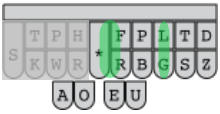
?*FRLG is [Control]+[?] as {#Control_L(?)}{^}{-|}?-FRLGTS is [Alt]+[?] as {#Alt_L(?)}{^}{-|}
?-TSDZ is [Super]+[?] as {#Super_L(?)}{^}{-|}
?*FRBLG is [Control]+[Shift]+[?] as {#Control_L(Shift_L(?))}{^}{-|}
?*FRLGTS is [Control]+[Alt]+[?] as {#Control_L(Alt_L(?))}{^}{-|}
?*FRBLGTS is [Control]+[Shift]+[Alt]+[?] as {#Control_L(Shift_L(Alt_L(?)))}{^}{-|}
?-FRBLGTS is [Shift]+[Alt]+[?] as {#Shift_L(Alt_L(?))}{^}{-|}
?-BTSDZ is [Shift]+[Super]+[?] as {#Shift_L(Super_L(?))}{^}{-|}
?-PTSDZ is [Alt]+[Super]+[?] as {#Alt_L(Super_L(?))}{^}{-|}
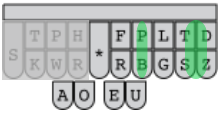
?-PBTSDZ is [Shift]+[Alt]+[Super]+[?] as {#Shift_L(Alt_L(Super_L(?)))}{^}{-|}Hitting the F1, F2, etc. function keys, you hit the simple navigation pattern of -FRLG with the appropriate left-handed number key. You can also add Control, Shift, and Alt to these function key presses. To hit the function keys from 6-9, you use the left hand simple navigation pattern of TKHR-, along with any desired modifier.
1-6R8G is [F1] as {#F1}{^}{>}
2-6R8G is [F2] as {#F2}{^}{>}
3-6R8G is [F3] as {#F3}{^}{>}
4-6R8G is [F4] as {#F4}{^}{>}
56R8G is [F5] as {#F5}{^}{>}
106R8G is [F10] as {#F10}{^}{>}
14R-6R8G is [F11] as {#F11}{^}{>}
12-6R8G is [F12] as {#F12}{^}{>}
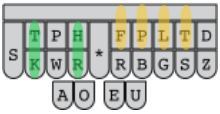
2K4R-6 is [F6] as {#F6}{^}{>}2K4R-7 is [F7] as {#F7}{^}{>}
2K4R-8 is [F8] as {#F8}{^}{>}
2K4R-9 is [F9] as {#F9}{^}{>}
The "[Super]" key is known to Windows users as the "Windows Key" or "Win Key". The "[Super]+
1-9SDZ is [Super]+[1] as {#Super_L(1)}2-9SDZ is [Super]+[2] as {#Super_L(2)}
3-9SDZ is [Super]+[3] as {#Super_L(3)}
4-9SDZ is [Super]+[4] as {#Super_L(4)}
59SDZ is [Super]+[5] as {#Super_L(5)}
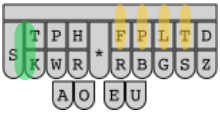
12K-6 is [Super]+[6] as {#Super_L(6)}
12K-7 is [Super]+[7] as {#Super_L(7)}
12K-8 is [Super]+[8] as {#Super_L(8)}
12K-9 is [Super]+[9] as {#Super_L(9)}
There are only 2 more goodies at this point: repeat commands and strokable help.
Repeat Commands
Stroke any number from 2 to 20, 30, 40, or 50 plus the asterisk and then a command stroke, and that stroke will be submitted that number of times. #H*/KPR-FRLG (which is seen by Plover as 4*/KPR-FRLG), for example, will send "[Up]" 4 times, and you will go up 4 lines.
Strokable Help
Stroking 0* and then a command stroke will print out what that stroke does, like:
[Up]
Stroking 1* and then a command stroke will print out exactly the definitions you see above, like:
KPR-FRLG is [Up] as {#Up}{^}{>}
I expect this will prove most useful for those who want to create a phonetic brief for an otherwise hard to remember stroke. Of course, I'd rather give the user a way to type the command they want and have the dictionary print out how to stroke it, but the world doesn't always give us our druthers. To make up that lack, I've written this document, and hope it proves helpful to you.
There are weaknesses in this system. Some are intrinsic and others can be repaired. It's intrinsic to the shortcut key system itself that many are hard to find, to learn, and to remember. I recommend learning them one program at a time and only at a speed at which you can add them to your regular, daily usage without causing excessive stress. A repairable weakness is how the key combinations can be daunting. Anyone with the motivation could come up with a more easily memorable, phonetic name for each combination they use frequently.
If I can help, drop me a line.
Kevin
Links:
Download the Single Stroke Commands Dictionary
Mouse vs keyboard: http://facweb.cs.depaul.edu/sjost/csc423/examples/anova/efficiency.pdf
This study compares the tedious alt+letter+letter method of keyboard navigation. The single stroke commands dictionary allows you to go faster than this document understands. Still, it's a good bit of work.
Links to loads of keyboard shortcuts: https://support.microsoft.com/en-us/help/12445/windows-keyboard-shortcuts
Create your own shortcuts: https://www.laptopmag.com/articles/create-keyboard-shortcuts-windows-10
23 December, 2017
Type Different
Picture in your mind typing out the word, "and ". In the quiet of your mind, you can feel those three fingers snapping down on the A N and D keys, and then your thumb smacking out a space. You know the shape and timing of the word, "and ". You can type it in under a second without thinking and without error, even though it's four separate actions that must happen in a precise order.
Stenography converts those four actions into one, allowing the stenographer to type faster than lawyers talk.
Imagine that world for a second. Imagine you could hit all four keys for the word "and " at once then smoothly move on in the same way to word after word, spraying 4 or 10 or 6 perfectly spelled characters on the page with each motion. Why stroke 4 keys, when you could lay down 2 or 3 or 4 words in the same amount of time? Who could walk away from a deal so sweet? In fact, why don't our computers already do this?
The rub is, "Dan"
If your poor computer sees you stroke A, D, N, and the spacebar all at once (assuming your computer reads what you typed from left to right), it would have no way to know whether you meant, "and" or "Dan". Even the shift key would offer no clue, because you might want, "And" and not "and". Therein is the awkward difficulty in word-based typing, and why us computer users still slog along with letter-based typing.
Stenography is the science of making word-based typing possible. It's complex, but within the grasp of most people. It works by settling on some soft rules.
1) The keys stroked on a stenographic keyboard are always read from left to right and top to bottom
2) The keyboard is rearranged with consonants clustered at the left and right and vowels in the middle so as to make the largest number of the most frequently used words typable with one stroke. Every remaining word, special character, and control character can be typed, albeit with 2 or more strokes
3) One finger often hits more than one key at a time, making more patterns possible
4) The total number of keys on a stenographic keyboard is actually smaller than the number letters in the alphabet. What is more, some of the keys appear on the keyboard twice -- yes, it works. The combining of keys makes up the difference
5) Stenographic words are typed by sound more often than by spelling, and those sounds become memory helpers pointing toward the shape of each word
6) Why have a spacebar at all? When you're striking a word at a time, it's obvious where the spaces should be, so a stenographer seldom types a space
Steno knows the difference between "and" and "Dan" because the steno keyboard actually has one D on the left side and another on the right. The stenographer can choose to stroke DAN or AND, making it clear to the computer just which he or she meant, and the principle extends to every word there is. Assigning a unique stroke to each and every word is a heady science, but one that's proven its validity over years of the most rigorous use.
Nothing about learning to type at 200+ words per minute comes cheap.
Remembering back to learning to type, there were many days of frustration when you knew what to type and your fingers just wouldn't do it. Stenography uses half as many keys, but does so in hundreds more ways, so achieving competency takes time. 2 years is the usual minimum time it takes a dedicated student to test at 225 words per minute. Learning to type different is a commitment, not a whim.
Everything about learning to type at 200+ words per minute is rich.
The exercise of absorbing new rules, the challenge of creating new muscle memories, and the new thinking patterns word-based typing allows are all addictive. The drudgery of typing is elevated for me into a rewarding experience full of wins, level-ups, and discoveries, except the skill I build will be available to me for years to come. This game makes a difference.
I'm not a dedicated student, so 2 years is not in the cards for me. I played at steno for just over a year before I was good enough to start using it daily for everything. After 4 months of daily use, I've almost made it back to my daily typing speed pre-stenography. I've watched others progress faster, and some much faster, but that's okay. I've enjoyed my journey so far, and it's clear I've still got plenty of room to grow. I may never hit 200, but 120 seems sure to happen someday. The quest is fun, and the future looks rosy. I was maxed out typing the same as everyone else, but I'm nowhere near my limits with stenography.
The people at the Open Steno Project are as friendly as I've ever met, and questions are always welcome. If I've piqued your interest, drop on by.
https://github.com/openstenoproject/plover/wiki
https://github.com/openstenoproject/plover/wiki/Links-to-the-Steno-Community
06 October, 2015
The Two Martians
The book is an 8+ hour investment, and by and large it gives good return on that investment the whole way through. The movie is a 3 hour investment, and it does the same. Both mediums gave me the experience of laughing my way through a deadly experience, and I highly recommend either one.
I recommend the book to everyone who:
- Wants to get the feel of the science behind the decisions the character makes
- Wants the feeling of an alien disaster to fully permeate their imaginations
- Wants to enter into Mark Watney's psyche
I recommend the movie to everyone who:
- Wants to share the laughter and fears with others as part of the experience
- Thrills to see human emotion as opposed to visualizing it
- Would rather block off 3 hours for the experience than catch as catch can with a book for 8 hours spread over however many days
Both gave me the same laughter, fear, and tears, but they did it in different ways and on different levels. To be sure, the movie added some preachy moralizing at the end that wasn't in the book, but I can live with that. The book is probably the better personal experience, if you have the time to invest, but there's something special about the shared experience of the movie.
As for books allowing you to really get into the character's head, I'm not so sure that's correct. The movie simply had to cut 6 hours of the experience. Many actions and events didn't make it into the movie, but virtually all the feelings did. Over and over again, I saw Mark Watney react emotionally to some event, and felt as much a part of it as when I was reading. A thing explained deeply in the book was a fleeting glance in the movie, but I found both powerfully fun.
Both are good for 4.5 out of 5.